author

Label Printer | Complete Guide to Thermal, Sticker and Barcode Label Printing Machines

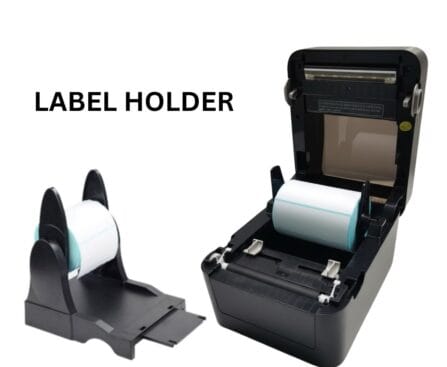
A dedicated label printer is designed to print labels, stickers, barcodes, product information, and other business details in different sizes and formats. For businesses that handle regular labeling work, using a specialized printer can be more convenient than using a standard office printer. At Billing Machine India, businesses can explore POS and printing solutions designed for different commercial requirements, including label and receipt printing solutions. What Is a Label Printer? A label printer is a specialized printing machine used to print information directly onto labels or adhesive materials. Depending on the printer and application, labels can include product names, prices, barcodes, QR codes, SKU numbers, batch details, addresses, and other information. Label printers are commonly used in retail stores, supermarkets, warehouses, courier services, e-commerce businesses, restaurants, pharmacies, and manufacturing units. Instead of manually writing or preparing labels, businesses can create consistent and professional-looking labels quickly. This can help improve product identification and make inventory and billing-related tasks more organized. What Is a Thermal Label Printer? A thermal label printer uses heat-based printing technology to create text, graphics, and barcodes on compatible label material. Thermal printing is popular because it is designed specifically for fast and convenient label printing. There are two common types of thermal printing: Direct Thermal Printing Direct thermal printing creates an image by applying heat directly to heat-sensitive label material. It is commonly used for applications such as shipping labels, temporary labels, delivery labels, and other short-term identification requirements. Thermal Transfer Printing Thermal transfer printing uses a ribbon to transfer the image onto the label material. It can be suitable when businesses require labels that need to remain readable for longer periods or withstand particular environmental conditions. The right type depends on your business requirements, label material, expected usage, and durability requirements. Why Use a Sticker Label Printer? A sticker label printer can be useful for businesses that need adhesive labels regularly. Instead of purchasing pre-printed stickers for every product or manually preparing labels, businesses can print customized stickers according to their requirements. For example, a retail store can use sticker labels for product prices and barcodes. An online seller can print shipping stickers, while a warehouse can create inventory identification labels. A dedicated sticker printer can also help maintain consistency in label size, formatting, and product information. Barcode Label Printer for Business A barcode label printer is particularly useful for retail stores, supermarkets, warehouses, distributors, and businesses that manage a large number of products. Barcode labels can contain product codes, SKU information, pricing details, or other identification data. When used with a compatible barcode scanner or POS system, they can help businesses manage product identification and billing workflows more efficiently. For example, a retail product label may include: Product name Barcode SKU number Price Product code Batch information Other relevant details A clear barcode is important because it needs to be easily scanned by compatible equipment. Therefore, businesses should consider print quality and resolution when choosing a barcode printer. Where Are Label Printing Machines Used? Modern label printing machines are suitable for a wide range of business applications. Retail Stores Retailers can use label printers to create product labels, price stickers, barcode labels, and inventory tags. This can help keep product identification organized. Supermarkets and Grocery Stores Supermarkets often manage hundreds or thousands of products. Barcode and price labels can make product management and identification easier. E-Commerce Online businesses require shipping and product labels for orders. A thermal label printer can provide a convenient solution for printing shipping information and package labels. Warehouses Warehouses can use labels for products, shelves, storage locations, cartons, and inventory tracking. Logistics and Courier Businesses Courier and logistics companies handle large quantities of packages every day. Clear shipping and identification labels are essential for organized package handling. Manufacturing Manufacturers can use labels for product identification, cartons, components, inventory, and other operational requirements. Important Features to Check Before Buying a Label Printer Choosing the right label printer requires more than simply looking at the price. Consider the following features before purchasing. Printing Speed If your business prints a large number of labels every day, printing speed is important. A suitable printer should be able to handle your expected workload efficiently. Print Quality Clear text and sharp barcodes are essential for professional labeling and reliable scanning. Choose an appropriate print resolution based on your label requirements. Label Size Different businesses use different label sizes. Check the printer’s supported label width and media specifications before making a purchase. Connectivity Depending on your setup, you may need USB, Ethernet, Wi-Fi, Bluetooth, or another connection option. Make sure the printer can work with your existing POS or computer system. Printing Volume Consider how many labels you expect to print daily. A small shop may have different requirements from a warehouse or large retail business. Ease of Use A user-friendly printer can make everyday printing easier for employees and reduce unnecessary operational complexity. Benefits of Using a Thermal Label Printer A good thermal label printer can provide several practical advantages for businesses: Fast and convenient label printing Clear product and barcode labels Professional-looking stickers Suitable for retail and inventory applications Convenient printing for shipping and packaging Consistent label formatting Reduced dependence on traditional ink-based printing Easy integration with many business workflows For businesses that print labels regularly, investing in a suitable label printing solution can save time and make routine operations more organized. How to Choose the Right Label Printing Machine? Before purchasing a label printing machine, first identify your actual business requirements. Ask yourself what type of labels you need, how many labels you print each day, which label sizes you use, whether you require barcodes, and how long the labels need to remain readable. You should also check whether the printer is compatible with your existing billing software, POS system, computer, or inventory management setup. For businesses already using POS billing systems, choosing compatible printing equipment can help create a more connected billing and labeling workflow.

POS Billing Machine for Retail Shops | Make Everyday Billing Faster and Easier

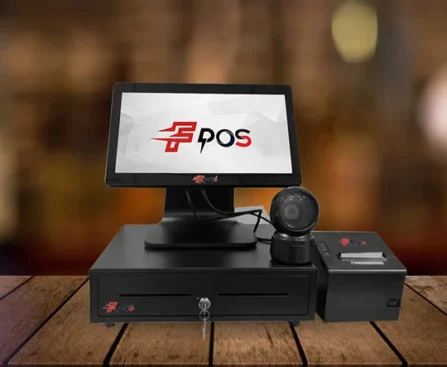
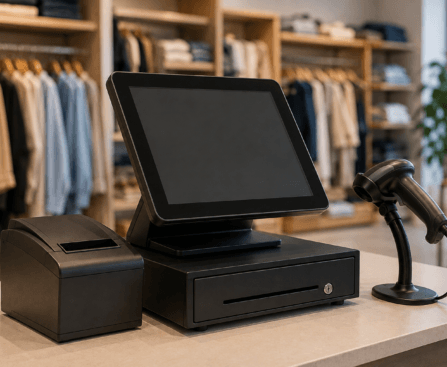
Running a retail shop means handling customers, products, prices, payments, and bills throughout the day. When billing is done manually, even a small mistake can lead to incorrect invoices, longer queues, and difficulty managing sales records. A POS billing machine for retail shops can make the entire billing process faster, more accurate, and easier to manage. Whether you own a grocery store, clothing shop, electronics store, general retail outlet, or other small business, choosing the right retail POS system can help you manage daily operations more efficiently. What Is a POS Billing Machine? A POS billing machine is a complete billing solution that allows retailers to create bills, calculate prices, manage products, and record sales from one system. Depending on the setup, it can also work with barcode scanners, receipt printers, cash drawers, and other POS accessories. Modern POS systems are designed to make checkout simple. Instead of manually calculating every item, the salesperson can scan the product, select the required quantity, and generate the bill within seconds. Why Do Retail Shops Need a POS Billing Machine? Retail businesses often deal with hundreds or even thousands of products. Managing everything manually becomes difficult as the business grows. A retail billing machine can help with: Faster customer checkout Accurate bill calculation Easy product and price management Quick receipt printing Better sales record keeping Reduced manual billing errors Easier day-to-day store management For busy retail shops, faster billing can also help reduce customer waiting time during peak hours. Key Features to Look for in a Retail POS System Not every retail shop has the same requirements. Before purchasing a POS system, consider the features that are most useful for your business. 1. Fast and Accurate Billing The primary purpose of a POS system is to simplify billing. A good system should allow staff to create bills quickly while automatically calculating prices, quantities, discounts, and totals. 2. Touchscreen Operation A touchscreen POS makes billing convenient and easy to operate. Staff can quickly select products and navigate through the billing software without complicated procedures. 3. Barcode Scanning For retail stores with a large product inventory, barcode scanning can significantly speed up checkout. Scanning a product can automatically bring up its details and price, reducing the need for manual entry. 4. Receipt Printing A POS billing machine can be connected to a receipt printer to provide customers with a clear printed bill. Fast receipt printing is particularly useful when several customers are waiting at the counter. 5. Inventory Management Managing stock is an important part of retail operations. A suitable POS solution can help retailers keep track of products and identify items that need to be restocked. 6. Sales Reports Sales information can help business owners understand which products are selling well and how the store is performing. POS systems can make accessing sales information more convenient than maintaining manual records. POS Billing Machine for Different Types of Retail Shops A POS system can be useful for many types of retail businesses. Grocery Stores: Quickly scan products, generate bills, and manage a large number of everyday items. Clothing Stores: Handle product variations such as sizes, colors, and different prices more efficiently. Electronics Shops: Maintain product information and generate accurate customer bills. General Retail Stores: Manage everyday sales and simplify the checkout process. The right setup depends on your store size, product range, billing volume, and business requirements. How a POS System Improves the Customer Checkout Experience Customers usually prefer a checkout process that is quick and straightforward. Long queues and billing mistakes can negatively affect their shopping experience. With a retail POS system, products can be added quickly, totals can be calculated automatically, and receipts can be printed within moments. This helps create a smoother checkout experience for both customers and staff.

Best Receipt Printers for Fast Food Shops, Grocery Stores & Supermarkets

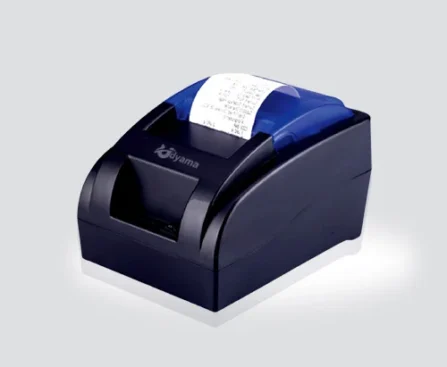
In today’s fast-moving retail and food businesses, quick and accurate billing is essential for providing a better customer experience. A reliable receipt printer helps businesses print bills quickly, reduce billing errors, and maintain a professional checkout process. Whether you operate a fast food shop, grocery store, or supermarket, choosing the right receipt printer can make daily billing easier and more efficient. At Billing Machine India, you can explore reliable POS billing solutions and receipt printers designed for different business requirements. Receipt Printer for Fast Food Shop Fast food businesses usually handle a large number of orders, especially during busy hours. A slow billing process can create long queues and affect customer satisfaction. A receipt printer for fast food shop helps print order bills quickly so customers can receive their receipts without unnecessary waiting. A good receipt printer can be connected with a POS billing system to streamline order processing. It is useful for printing customer receipts, order details, and transaction information. Benefits of a Receipt Printer for Fast Food Businesses Fast and reliable receipt printing Helps reduce waiting time at the counter Easy integration with POS billing systems Clear and professional receipts Suitable for busy food counters and restaurants Helps maintain organized transaction records For businesses handling multiple orders every day, a dependable POS and receipt printing setup can improve the overall billing workflow. Receipt Printer for Grocery Store Grocery stores deal with a wide variety of products and frequent customer transactions. From small purchases to large shopping bills, fast billing is important for maintaining an efficient checkout counter. A receipt printer for grocery store can work alongside a POS billing machine to print customer invoices quickly. Thermal receipt printers are particularly useful because they generally offer fast printing without requiring traditional ink cartridges. With an efficient billing system, grocery store owners can manage product sales, generate receipts, and provide customers with accurate transaction details. Why Grocery Stores Need a Reliable Receipt Printer A quality receipt printer can help grocery businesses: Speed up the checkout process Print clear and easy-to-read receipts Reduce manual billing work Improve customer service Support POS-based billing operations Maintain better transaction documentation For growing grocery stores, combining a POS billing machine with a dependable receipt printer can create a smoother and more organized checkout experience. Receipt Printer for Supermarket Supermarkets typically handle hundreds or even thousands of transactions, depending on their size and customer volume. Therefore, billing equipment needs to be reliable and capable of handling continuous use. A receipt printer for supermarket is an important part of a modern POS setup. It allows cashiers to print customer receipts quickly after completing each transaction. A suitable printer should provide consistent performance, clear printing, easy operation, and compatibility with the supermarket’s POS billing software and hardware. Key Features to Look For When selecting a receipt printer for your supermarket, consider the following factors: 1. Fast Printing Speed A high-speed printer can help reduce queues at busy checkout counters. 2. Reliable Performance Supermarkets require equipment that can handle regular and continuous printing. 3. Easy Connectivity Choose a printer that supports the connection options required by your existing POS system. 4. Clear Receipt Quality Receipts should be easy for customers to read and contain accurate billing information. 5. Compact Design A space-saving printer can be useful for checkout counters where workspace is limited. How to Choose the Right Receipt Printer? The right receipt printer depends on your business size, transaction volume, POS setup, and printing requirements. Before purchasing, check compatibility with your billing machine and software. For a fast food shop, printing speed and quick order processing may be the priority. Grocery stores may need a printer that supports frequent daily transactions, while supermarkets may require a durable solution designed for high-volume billing. It is also important to consider connectivity, paper size, printing technology, maintenance requirements, and long-term reliability. Upgrade Your Billing System with Billing Machine India A professional billing setup can make a significant difference to your business operations. From receipt printers to POS billing machines, having the right equipment helps businesses manage transactions more efficiently and provide a better customer experience. Billing Machine India offers POS and billing solutions for different types of businesses, including fast food shops, grocery stores, supermarkets, retail outlets, restaurants, and other commercial establishments. If you are looking for a receipt printer for fast food shop, receipt printer for grocery store, or receipt printer for supermarket, explore the available billing and POS solutions at Billing Machine India and choose equipment that matches your business requirements.

How Modern POS Systems Improve Restaurant Billing, Orders & Customer Experience?

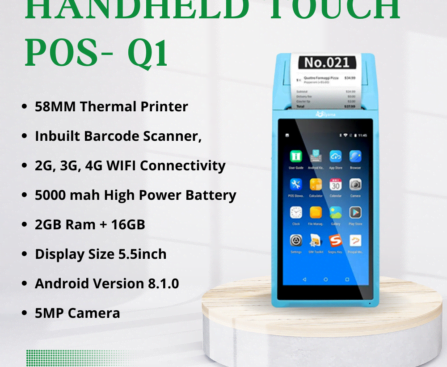
How Modern POS Systems Improve Restaurant Billing, Orders & Customer Experience? Smart POS has become a successful part of any restaurant these days as they work behind the scenes, manages orders, processes payments, and keeps the kitchen in sync. This is no longer a luxury but a necessity. As per the report for National Restauranrt Association State of Restaurant Industry 2025, 70% of restaurants that adopt modern tech reported a gain in productivity and efficiency. This is not a small number but a prime number and is in the growing stage. Billing Without the Bottlenecks It is quite a hard time standing in long queues, waiting for your number. Sometimes, billing errors cause frustration customer and cost the restaurant that repeats business. A Windows Touch POS for Restaurants is one that handles high transaction volume with accuracy and speed. It happens to be the go-to-choice for full-service, dine-in setups. Since billing is fast, with evaluations being automatic, there remains a lower level of risk for human errors. Orders That Go Straight to the Kitchen A Handheld Touch POS for Restaurants puts that power directly in a server’s hands. Orders are placed at the table and sent to the kitchen in real time, with no room for miscommunication. Flexibility That Matches Your Format An Android Touch POS for Restaurants covers all restaurant work same scenarios affordably, and it’s no surprise that mobile POS terminals now account for 55% of the global restaurant POS market in 2025, as reported by Future Market Insights. Receipts That Reflect Your Brand A clean, itemized bill matters more than most restaurateurs think. Pairing a Receipt Printer for Restaurants with your POS system means customers leave with a professional receipt — and a better last impression. Digital receipt options also reduce paper waste, which resonates with today’s environmentally aware diners. Turning Data Into Better Dining Apart from billing, modern POSD collects needed info, like who’s buying and when it sells. What sells, etc. Further, according to the Grand View Research, POS functions like inventory control, customer feedback, and sales analysis are key drivers that push the market adoption forward. As such, restaurants that use this data make a smart choice, reduce wastage, and keep their customer coming back. Billing Machine India offers a wide array of restaurant-grade POS hardware, from handheld terminals to receipt printers, made for the pace and needs of real restaurant backdrops.

Best POS System for Grocery Store: Android Touch POS vs Windows Touch POS Explained

Best POS System for Grocery Store: Android Touch POS vs Windows Touch POS Explained There’s a great advancement in the billing system that has been introduced over the past 5 years. As such, there’s no longer a counter inside any grocery store in India. Things like clunky desktop setups, which once constituted a receipt printer, monitor, and keyboard, all separately, have been replaced by something fast, sleek, and more capable these days. However, when it comes to finding the best system, one that could be the right fit for you, it depends on a few things; most buyers skip it and just come to know only after they have purchased one. Android Is Where Most Grocery Stores Should Start The Android Touch POS for Grocery Store works on an open OS, which means it’s compatible with a wide range of billing and inventory apps without locking you into one software vendor’s ecosystem. For instance, in a grocery business, that openness translates directly into flexibility. Barcode scanning, GST-compliant invoicing with full CGST and SGST breakdowns, loyalty program integration, and multi-mode payment acceptance. Here, the UPI, credit and debit cards, and QR codes, well, all run from the same touchscreen terminal, without separate hardware for each operation. A Handheld Touch POS for Grocery Store solves a problem that fixed-counter setups create every weekend and every festive season: congestion. What Your Receipt Printer Actually Does Every Day? People usually underestimate this piece until it starts developing problems. A thermal Receipt Printer for Grocery Store prints using heat rather than ink, with no ribbons, no toner, and no cartridges to replace. Thermal printers in this classification print at speeds up to 160mm per second at 203 DPI resolution, producing clean, GST-compliant receipts that hold up as valid records. When Windows Makes More Sense Than Android? Here’s where the decision splits. A Windows Touch POS for Grocery Store is built for a different kind of workload. A typical small grocery store organizes over 15,000 unique SKUs, and a large one manages extensively more. In conclusion, stop assuming and start resembling. Head to Billing Machine India and browse grocery-specific POS solutions built for Indian retail. The team puts the right hardware in front of you, equally matched to your everyday transaction volume, counter setup, and store size.

Top Features to Look for in an Android POS Billing Machine with Receipt Printer

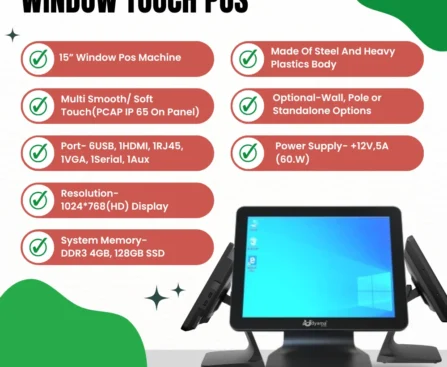
Top Features to Look for in an Android POS Billing Machine with Receipt Printer There’s always been something wrong with the milling machine purchases. This is because businesses do pick the most cost-effective budget option to set it up. As such, they discover their printer getting jammed under load.  Further, the system has no offline mode, and the software required here doesn’t run on that operating system. This guide exists to close that gap, so you know exactly what to look for before you spend a rupee. The Operating System Sets the Ceiling on Everything Else Start here, because everything downstream, your billing software, your GST reports, and your payment integrations, depends on the OS your machine runs. An Android POS Billing Machine operates on an open platform. This means it supports a broad library of applications that can be installed through the Play Store. Further, it can be personalized for your specific business needs. This doesn’t lock you into one software vendor’s ecosystem. Portability Is a Feature, Not a Category There’s a meaningful operational difference between a machine bolted to a counter and one a staff member can carry. A Handheld Touch POS Machine with a built-in printer brings billing to any transaction that is happening: tableside in a restaurant, across the shop floor in retail, or at a customer’s doorstep during a delivery. What Do Your Receipt Printer Specifications Actually Mean Day-to-Day? An inbuilt Receipt Printer using direct thermal technology prints using heat rather than ink. There’s no  thermal paper, no toner, no ribbons or cartridges, and no printhead. However, the modern built-in thermal printers in Android POS devices print at speeds up to 160 mm per second at resolutions of 203 DPI or even higher. Android vs. Windows: This Decision Depends on Your Workload A Windows Touch POS isn’t for all; however, it’s the correct option when it comes to picking the right business. These machines have an i5 processor, a 128GB SSD, and 4GB RAM storage that handles numerous location inventory transaction databases, enterprise-grade, and accounting integrations. This is far more suitable than other standard Android hardware. In case you’re still figuring out which setup suits your operation. Head to Billing Machine India and browse the complete range, viz., Android, Windows, and handheld solutions, all in one place. Our team here will help you match hardware to your actual workflow, rather than just handing you the nearest available match.

POS Billing Machine for Retail Shop: Features You Must Look For

POS Billing Machine for Retail Shop: Features You Must Look For There’s a version of this decision that goes badly. A shop owner picks up a billing machine based on price alone, gets it home, and discovers it doesn’t generate proper GST invoices, won’t connect to a barcode scanner, and freezes every time the internet cuts out. Three months later, they’re back to square one. In this guide, you’ll get to know how to avoid falling into such errors. Start With GST Compliance: Everything Else Is Secondary This is not optional in the country. A POS Billing Machine that cannot print invoices with HSN codes, CGST, and SGST breakdowns is not a billing machine for Indian retail. Further, this is an expensive receipt printer. Prior to looking at any other feature, one must ensure that GST-compliant invoice generation is built in, not an add-on you pay extra for later. Barcode Scanning Changes Everything at the Counter Manual item entry during billing is a slow cum error-prone process. A proper POS Billing Machine For Retail Shop supports exterior barcode scanner connectivity, which may be wired or wireless. Further, it should recognize standard in-store barcodes automatically. A comparison between a scanned item and a typed one is that one might seem small per transaction. Multiply that across hundreds of daily bills, and it becomes a very real operational gap. No Ink. No Ribbons. No Recurring Headaches. Thermal printing here is considered to be the standard for a reason. A quality Billing Print Machine using thermal technology needs nothing beyond a paper roll to operate. It doesn’t require cartridges, toner, or ribbons. For a counter that runs through dozens to hundreds of receipts daily, removing the ink price and printhead maintenance is a clear win that compounds over months and years. Restaurants and Retail Shops Are Not the Same Problem A Billing Machine For Restaurant is built around menu customization, kitchen order routing, split bills, and table management. These types of features are irrelevant to a clothing store or pharmacy, and on the other way around. In conclusion, take the guesswork out of it, and browse Billing Machine India full range and find the right fit for your business. This is just the suitable, nearby available option. Billing Machine India matches you with billing hardware that works exactly the same way your counter does.  

Smart POS Solutions for Supermarkets: Faster Billing, Better Control & Seamless Customer Experience

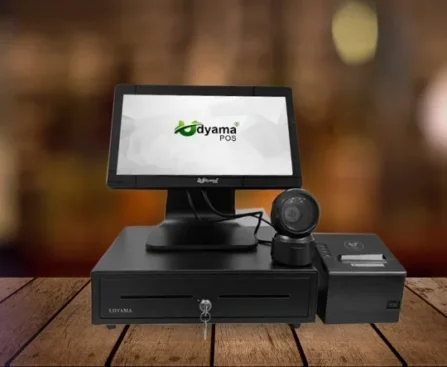
Smart POS Solutions for Supermarkets: Faster Billing, Better Control & Seamless Customer Experience Running a supermarket today means more than just stocking shelves. Speed, accuracy, and a seamless customer experience are key. Long lines, mistakes, and outdated systems quickly create stress in a busy store.Modern POS technology can transform operations. The right system makes daily tasks faster, easier, and more reliable. What do modern retailers really need? Supermarket owners need more than machines—they need solutions tailored to daily routines. Fast scanning, simple inventory management, and quick billing matter.A good POS system makes counters efficient and lets staff focus on customers, not technical issues. What makes a POS solution complete? A reliable POS isn’t just one device. It’s a suite of connected tools—billing systems, portable devices, and printers—that streamline every transaction.Each part of the system has its own role: Android Touch POS for supermarkets makes billing quick and easy with a simple interface. Handheld Touch POS for supermarkets lets staff move around and help customers anywhere in the store Receipt Printer for Supermarket ensures fast and clear billing receipts without delays Windows Touch POS for supermarkets is a more advanced system, ideal for larger supermarkets. All these tools work together to efficiently support both small shops and large supermarkets. Made for speed and built to last Imagine a checkout where transactions take seconds, not minutes. Errors are rare, and customers avoid long waits. That’s the power of a good POS.udyamapos offers practical, easy-to-use, and reliable solutions for real-life situations. The goal is simple: make business operations smoother without complicating things. Building trust through strong performance Technology only helps if it works daily. Supermarket owners rely on POS systems—any delay or issue can impact sales and customer satisfaction.That’s why reliability, durability, and support matter as much as features. A trusted system enables: Smooth billing during peak hours Accurate inventory tracking Reduced human errors Better customer experience When systems work well, businesses can grow confidently. More than just billing: full business control Modern POS systems do more than handle billing. They help store owners better understand their businesses.With the right setup, you can: Track daily sales easily. Monitor stock levels in real time. Identify fast-moving products Manage staff performance Generate useful reports for decision-making. These insights help turn tasks into smart strategies. Flexible solutions for stores of any size Every store is different, whether it’s a small grocery store or a large supermarket. A good POS provider understands this and offers flexible solutions. From compact systems for small stores to advanced setups for large retail spaces, udyamapos ensures every business gets exactly what it needs. Easy to use and easy to adapt One of the biggest challenges for training staff, which is often the hardest part of using new technology. Complicated systems can slow things down rather than help matters.A good POS system should be: Easy to learn Quick to operate Comfortable for daily use When staff are at ease with the system, productivity rises. Support: Support you can count on using a POS system is not a one-time decision—it’s an ongoing relationship. Support and service play a crucial role in ensuring smooth operations. Getting help quickly and having good guidance makes a big difference in building trust. Take the next step toward smarter retail If you want to upgrade your supermarket or start with a modern setup, now is a great time. The right POS system can save time, reduce errors, and keep customers happy for years to come. Make your billing faster Manage your store smarter Deliver a better experience to every customer Ready to upgrade your supermarket? Start your smoother, smarter retail journey. Whether you want options, details, or a custom setup,Ask us today and see how the right POS system can transform your business.

From Counters to Kitchens: Handheld Touch POS for Fast Food Shop That Works Faster

From Counters to Kitchens: Handheld Touch POS for Fast Food Shop That Works Faster Behind every successful fast food outlet is more than great taste: quick decisions, fast billing, smooth coordination, and a system that keeps everything running. In peak hours, even a small delay affects customer experience. That’s where smart technology comes in. Its purpose is to make things simpler, not more complicated. A smarter way to manage your business Modern food businesses need fast, reliable, and easy-to-use tools for seamless order taking, billing, and sales management. This is exactly what Udyamapos focuses on: creating POS solutions that address real business challenges and solve them without unnecessary complexity. What the brand offers The goal is simple: make business operations smoother so owners can focus on what truly matters, which is serving customers. Key services include: Easy-to-use billing systems Fast order management solutions Inventory tracking support Sales reporting and insights Hardware integration for complete setup. These solutions are designed for real-life situations, where speed and clarity matter more than technical jargon. Built for speed and simplicity In a fast food shop, every second counts. Long queues, multiple orders, and busy staff need a system that keeps everything flowing.That’s why solutions like Android Touch POS for Fast Food Shops are becoming essential. They help staff take orders quickly, manage billing, and reduce waiting times without confusion.Simple interfaces and fast response systems make it easy for new staff members to adapt. Mobility that changes everything Sometimes, the best service happens where the customer is. Handheld systems make a big difference. With a Handheld Touch POS for a fast food shop, staff can take orders right at tables or in queues. This reduces delays and improves the customer experience by processing orders instantly, without extra steps. Clear billing builds trust Customers appreciate transparency. A clear, accurate bill builds confidence and professionalism.A reliable Receipt Printer for a Fast Food Shop helps businesses provide fast, clean, and error-free billing. This saves time and adds credibility to the service. Why trust matters in business tools Technology is only helpful when it works consistently. Business owners need more than just features; they need reliability. Systems should work every day, even during rush hours, without unnecessary downtime.That’s why choosing the right POS partner is important. A good system not only supports operations but also reduces stress. What makes this solution dependable Businesses choose systems they can rely on. Here’s what builds that trust: User-friendly design – Easy for staff to learn and use Fast performance – No lag during peak hours Durability – Built for daily business use Support availability – Help when you actually need it Scalability – Grows as your business expands. Together, these factors make the system a natural fit for your business. Helping businesses grow confidently When operations run more smoothly, businesses naturally grow faster. Owners can focus on improving food quality, expanding menus, and serving more customers without worrying about backend chaos.udyamapos plays a quiet but important role in this journey by ensuring the system works so the business can thrive.e. Designed for real-world challenges Every fast food shop is different. Some are small takeaway counters, others are busy multi-outlet chains. A good POS system adapts to both.Flexible setups, customizable features, and practical design make it suitable for businesses of all sizes and needs. Take the next step If you run or plan a fast-food business, choosing the right POS system matters.A smooth billing process, faster service, and better customer experience are not luxuries. They are necessities today. Take action today: Explore smart POS solutions. Upgrade your billing system. Improve customer experience Grow your business with confidence. Choosing the right system now can save you countless hours in the future. Final thoughts A fast food business runs on speed, accuracy, and trust. The right tools make managing orders and customer relationships easier. With thoughtful solutions and a focus on simplicity, udyamapos helps businesses move forward without friction, one smooth transaction at a time.

Smart POS Systems for Bakeries: Simplifying Daily Operations & Boosting Sales

Smart POS Systems for Bakeries: Simplifying Daily Operations & Boosting Sales When you visit a modern bakery, you notice more than just the smell of fresh bread and cakes. There’s a sense of speed, organization, and a smooth experience. Customers expect fast, accurate service and an easy checkout. Bakery owners often juggle orders, inventory, billing, and customer satisfaction simultaneously, which can be overwhelming. Smart technology makes these tasks easier and more manageable. Why bakeries need smarter systems Beyond baking, efficiently handling these diverse tasks is now an essential part of running a bakery. Taking orders quickly Managing stock of ingredients Handling multiple billing requests Keeping track of daily sales Ensuring smooth customer flow Without the right tools, even busy bakeries can face delays and confusion. Smart POS systems help streamline daily operations. Technology that fits into daily routines For this reason, modern POS systems are designed to fit seamlessly into a bakery’s daily routine. They are easy to use, respond quickly, and work well whether you run a small shop or a large bakery chain. With solutions like Android Touch POS for Bakery Shop or other bakery-specific POS systems, staff can handle billing with just a few taps. These systems are easy to use and require minimal training, making them ideal for busy bakeries. Faster billing, happier customers During peak hours, handling the rush is a major challenge for bakeries. In these moments, customers especially appreciate fast service when buying items like pastries or snacks. A Receipt Printer for a Bakery Shop makes billing both fast and accurate. Clear receipts help build trust and make transactions easier, saving time and avoiding confusion for everyone. Mobility that changes everything With mobile POS devices, staff aren’t stuck behind the counter. Using a Handheld Touch POS in a bakery shop, they can move around, take orders directly from customers, and reduce waiting times.This flexibility is helpful in busy bakeries with limited space or high customer volume. It lets staff give better service without making things more complicated. For those who prefer structured systems Some bakery owners prefer a more structured POS system, such as a Windows Touch POS for bakery shops , rather than mobile or Android-based options. These POS options offer a familiar setup, strong billing features, reporting, and inventory management. This type of system is ideal for bakeries with many orders that require detailed tracking and reporting. This leads to the question: what makes a good POS system for bakeries? Choosing the right POS system isn’t just about features. It’s about how well it fits your daily needs. A good system should offer: Ease of use – Staff should learn it quickly. Speed – Fast billing during rush hours Accuracy – No errors in pricing or calculations Flexibility – Works for both small and large setups Reliable support – Help when needed Taken together, these factors create a smooth experience for both bakery owners and customers. A partner that understands bakery needs Given these unique rhythms, bakeries require systems that keep up without causing delays—early mornings, busy evenings, and steady customer flow all day. With this understanding, Udyamapos offers solutions that address real-world challenges. The aim is to keep technology simple, practical, and reliable for daily use, not complicated. Small improvements, big results These small improvements—like faster billing, better inventory tracking, and smoother operations—can significantly increase customer satisfaction and boost sales.With the right POS system: Waiting time reduces Order accuracy improves Staff productivity increases Customer experience becomes better. While each improvement may seem minor on its own, together they can significantly change how a bakery runs. As bakeries expand, so do their needs—a small shop might become several outlets over time. Having a system that grows with you supports organization as you open new locations. udyamapos supports this growth with solutions that scale, keeping owners organized and confident at every stage. Running a bakery combines art with responsibility. While the art is in creating delicious products, managing the business efficiently is equally vital. Smart POS systems bridge this gap, letting bakery owners focus on what they love while technology manages the rest. Take the next step to transform your bakery—reach out today to explore how the right POS system can streamline your processes and elevate your customer experience.